A sua rádio no ar 24 horas. Sem ninguém de plantão.
Atualiza Studio plays your programming, runs the commercials right on time and announces the time and temperature. It installs on the studio computer, runs on its own and keeps you on air if the internet drops.
Download and install on Windows · version 2.20.4 · updated on 30/10/2026
- Program installed on Windows
- Teste grátis com cupom · Já tenho cupom
- On air in minutes
Built from the problems that happen in the middle of the night
Every Atualiza Studio feature was born from a real on-air failure — not from a feature list.
“They forgot to air the 10 a.m. spot.”
Breaks run on their own, every X minutes or at set times — with opening and closing jingles.
“The internet went down and the station went silent.”
Programming plays from files on your own computer. If the connection drops, the station keeps going with the latest data until it's back.
“After 10 p.m. there's no one in the studio.”
The automatic broadcast takes over at the scheduled time and hands the air back to the schedule when it ends.
“The advertiser's contract expired and the spot kept playing.”
The campaign has an end date: the next day the spot goes off air automatically.
“The client asked for a report of what aired.”
Every piece of audio that airs is logged with date and time for 90 days on the studio computer.
“The operator changed the song and cut off what was playing.”
The track on air is never interrupted by a position change in the schedule. It only changes when you tell it to.
See the program in action
Choose how you want to get to know Atualiza Studio: a quick overview or the full video with every feature. Both play right here, without leaving the page.

Watch the full video with every feature
Every feature of the program, explained step by step — it plays right here, without leaving the page.
An entire radio station inside one program
No add-on modules and no per-feature fees. Your subscription unlocks everything on this page.
Live programming schedule
Build the sequence by dragging. Reorder, insert and delete while on air: the track that's playing is never cut off.
Automatic commercial breaks
By interval (every 15, 20, 30 min) or at set times. Choose whether to cut the current audio or wait for the song to finish.
Campaign with end date
Each spot can have its own times and the date its contract ends. After that, it stops airing on its own.
Live and automated broadcasting
Tune into an external link (news, soccer, network feed) with persistent reconnection if the signal drops — or leave a folder playing on its own.
AutoDJ that doesn't repeat
In shuffle mode, no song repeats within 7 days and jingles play at the interval you set.
Spoken time check
Tone, hour, and minute stitched together with no gaps between files — it sounds like a single voice-over, not three clips glued together.
Temperature and forecast
Your city's temperature goes on air as a voice-over, and the 5-day weather forecast stays on screen for the announcer to talk about.
Special dates
The national calendar comes preloaded, and you add dates for your city and your own station.
Crossfade and auto volume
Transitions of 1 to 3 seconds, in the scope you choose. Music ducks automatically during voice-overs and comes back up at the end.
Separate cue
Listen on headphones through a separate audio output, without any of it going on air.
Sound effects board
Jingles, sound effects, and beds on color-coded buttons, one click to go on air — plus a password-protected set for each announcer.
News and announcements
The day's news on the studio screen and the station's messages (campaigns, testimonials, notices) added in the browser, ready for the announcer to read.
Always on air
If the program closes unexpectedly, it reopens on its own. It launches with Windows when the computer restarts — and every stop is logged with date and time.
Studio protected
Password-protected exit, Alt, Windows, and F11 keys locked on the console and, if you want, the computer's internet restricted to the program only.
Full history
What played and who did what, at the time it happened: spots, broadcasts, settings changes, logins. Kept for 90 days, with a copy on the server.
Auto volume, tuned to the way your station sounds
The music drops to the level you choose during the voice-over — and comes back up on its own at the end.
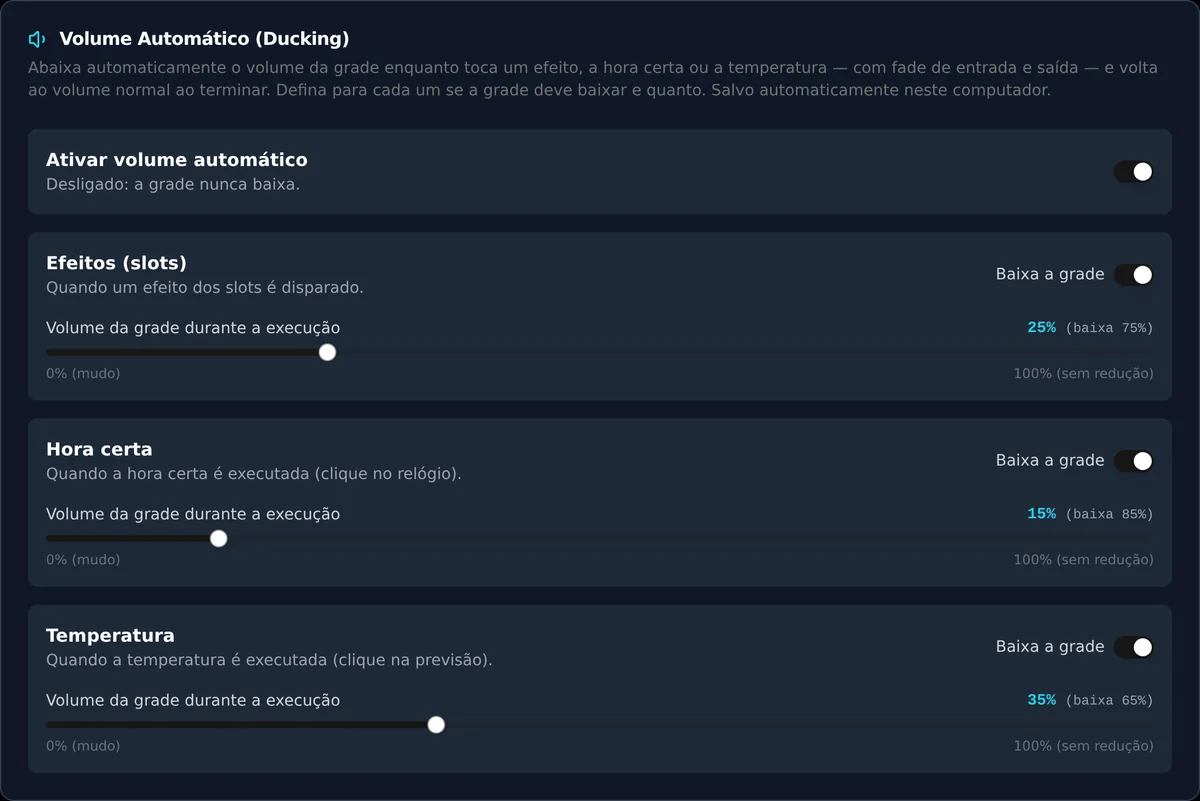
These are screens of the app running
No illustrations, no mockups: what you see below is Atualiza Studio on air, with a demo station.
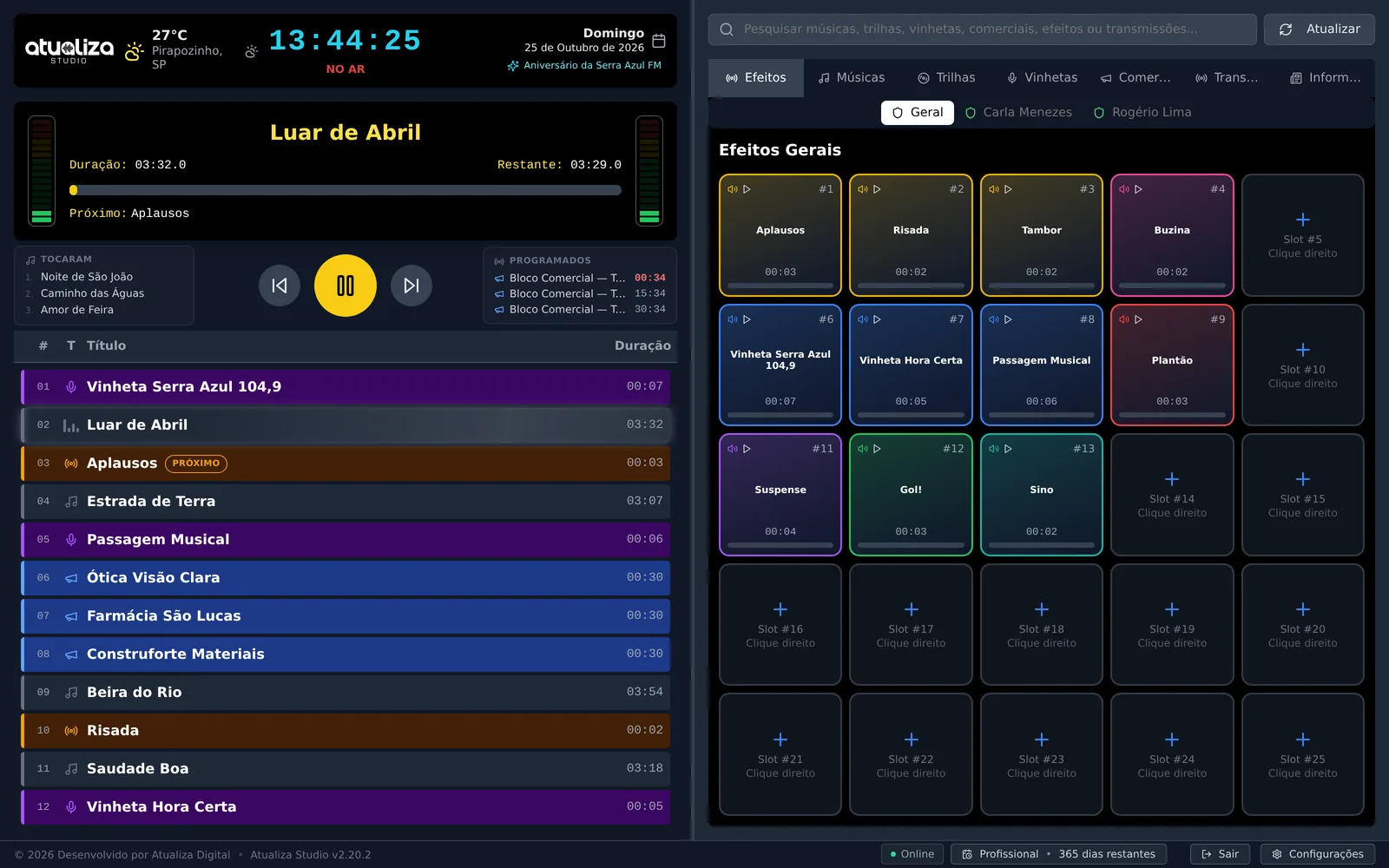
Everything that matters on one screen
Clock, temperature, today's special date, what's on air with time remaining, what already played, and what's coming up — with the schedule color-coded by audio type and the sound effects panel alongside, one click for each jingle, effect, or bed.
From sign-up to on air in one afternoon
No server to rent, no technician to set things up, no moving your library anywhere.
Create the account
Assine direto pelo site ou peça um cupom de teste grátis no WhatsApp e ative na sua conta. Você confirma o e-mail com um código e a conta fica pronta.
Install it on the studio computer
One Windows installer. Sign in with your browser (Google, Microsoft, Apple, Facebook, or email) or with email and password, and you're at the operator console.
Point to your folders
Songs, beds, jingles and spots stay where they've always been, on your hard drive. The app only reads from there.
Keep on air
Build the schedule, set up the commercial breaks and times. From then on, your station runs on its own.
Why an installed program, not a website
Radio is mission-critical: your broadcast can't depend on an open browser or stop every time the internet hiccups.
Internet drops, you stay on air
Audio plays from the files on your computer. The internet verifies your license and brings in the time check, weather, news, and spots from the cloud; if it drops, the program keeps going with the latest data until the connection is back.
Your audio stays yours
Your music isn't uploaded anywhere. The app points to the folders you choose and reads straight from the disk.
One studio per subscription
The license allows one studio at a time. If the computer freezes or the power goes out, the slot comes back on its own in five minutes.
One subscription, your whole station
Every feature in both billing periods. With annual, you pay less per month.
Studio Profissional
Every feature in the system, one studio on air.
- Programming schedule with songs, beds and jingles
- Automatic commercial breaks, by interval or fixed time
- Spoken time checks and temperature
- Scheduled live broadcasts and AutoDJ
- Cue on a separate audio output
- Sound effects board per announcer
- Manage commercials from the browser
- Airplay log for the last 90 days
- WhatsApp support from the people who build it
No contract and no setup fee. PIX, card, or bank slip (boleto), with payments processed by Asaas.
Want to see it first? Chame no WhatsApp e teste grátis. Já tem um cupom? Criar conta
What people ask before subscribing
Yes. The program uses the internet to verify your subscription license and keep the time check, temperature, weather, news, and cloud spots up to date. If the connection drops, the station keeps playing with the latest data saved on the computer — and everything updates on its own when the internet is back. Offline, the license is valid until the end of the paid period; after that, the program needs internet to confirm the renewal.
Chame a gente no WhatsApp e receba um cupom de teste. Depois, crie a conta com Google, Microsoft, Apple, Facebook ou e-mail, confirme o e-mail com o código que chega na sua caixa de entrada, ative o cupom na sua conta, baixe o programa e use tudo durante o teste. No fim do teste o programa é bloqueado até você assinar o plano mensal ou anual — e libera sozinho assim que o pagamento cair, sem perder nada do que configurou.
It comes back on air on its own. If the app closes by accident (a crash, someone ended it from Task Manager), it reopens in seconds; if the computer restarts, it opens with Windows. Closing the window with Alt+F4 doesn't take the station off air — you can only exit with the Exit button. Every launch and close is logged in Activity, with date, time and reason.
On a Windows computer in the studio. It's an installed app with its own installer — not a website in the browser. It doesn't need a powerful machine — it plays audio, it doesn't edit video.
No. You point to the folders already on your disk (songs, beds, jingles, spots) and the app reads straight from them. Only the spots you want to manage in the browser live in the cloud.
The subscription allows one studio on air at a time — that's what keeps the price fair. You can install it on as many computers as you like, but only one stays connected. If the computer freezes or the power goes out, the slot frees up on its own in five minutes.
You build breaks with the advertiser's audio and choose how they fire: every X minutes within a time window, or at set times. Each break can cut off what's playing or wait for the song to finish, and can have opening and closing jingles.
You set an end date on the spot. Starting the next day, it stops airing on its own — no one has to remember to pull it.
Yes. Every piece of audio that airs is logged with date and time on the studio computer, and the history keeps the last 90 days.
With Atualiza Digital, by WhatsApp or email — the same contacts in this page's footer. Support comes from the people who build the app.
By tomorrow night, your station could be running on its own.
Subscribe, install it on the studio computer and point to your folders. The app does the rest.